# Link
A select box gives you the option to choose what type of link you'd like to create. When set to URL it gives you a text box to enter the hyperlink. When set to Entry it opens a stack with all your entries to choose from. And when set to First Child will redirect a visitor to the first child page in a structure.
## Overview
For when you want to create a link to a URL or entry, this fieldtype is here for you. We often see it used in [Grids](/fieldtypes/grid.md) and [Replicators](/fieldtypes/replicator.md).
## Data Storage
``` yaml
---
url_link: 'https://statamic.com'
entry_link: 'entry::9d682ce3-a353-4fdd-af5e-c1d21b7a87f7'
first_child_link: '@child'
```
## First Child
Creating a "first child" link will dynamically return the URL to first entry nested below in a [Structure](/structures.md) or [Navigation](/navigation.md).
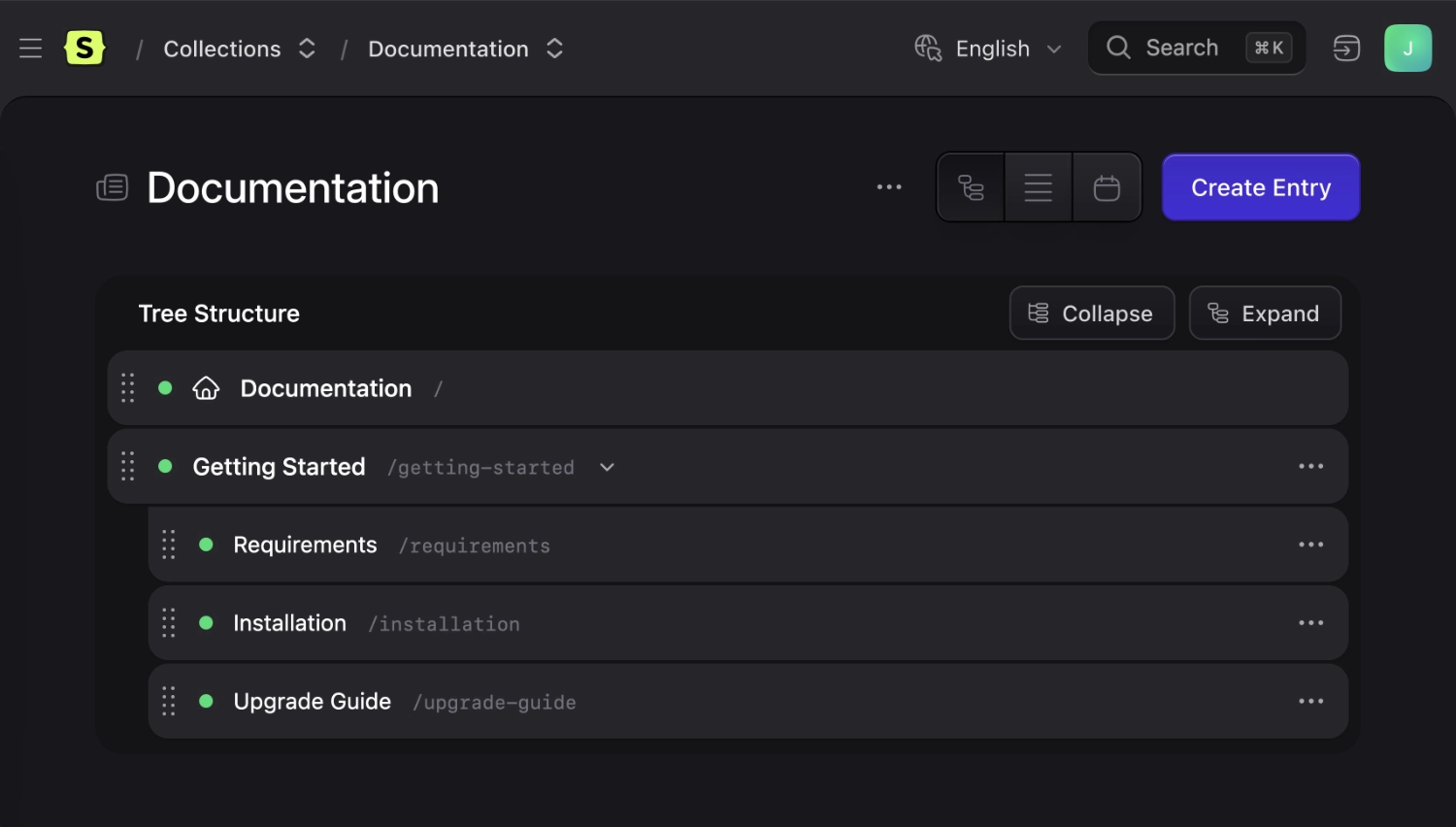
For example, if you set a First Child link on the Getting Started entry below, it will return the URL to the "Requirements" entry.
This option will only be provided when the field is in a collection. Globals and terms, by their nature, don't have children.
## Templating
Link fields will render a URL string you can use however you choose.
::tabs
::tab antlers
```antlers
Check out Statamic!
```
::tab blade
```blade
Check out Statamic!
```
::
```output
Check out Statamic!
```
You can access other data of the link field by using it like an array. This could be the title of an entry you link to, for example.
::tabs
::tab antlers
```antlers
{{ link_field:title }}
```
::tab blade
```blade
{{ $link_field['title'] }}
```
::
## Extending
Addons can register their own link types, adding new options to the type selector alongside URL, Entry, and Asset.
Register a link type by giving `Statamic\Fieldtypes\Link` a handle and a class extending `Statamic\Fieldtypes\Link\LinkType`, typically from a service provider's `boot()` method:
```php
use Statamic\Fieldtypes\Link;
Link::extend('form', \App\FormLinkType::class);
```
Your `LinkType` class controls how the type is displayed, how a stored value resolves back to a real link, and what fieldtype powers its picker:
```php
handle()}";
}
public function fieldtype(Field $field): ?array
{
return ['type' => 'form', 'max_items' => 1];
}
}
```
Values are stored with your handle as a prefix, the same way entries and assets are (for example `form::contact-us`).
Once registered, your type automatically gets its own picker in the field's type selector, rendered using whatever fieldtype you return from `fieldtype()`.
If your link type needs its own config options in the field's config sidebar — similar to how Entry has `collections` and Asset has `container` — override `configFieldItems()`:
```php
public function configFieldItems(): array
{
return [
'forms' => [
'display' => 'Forms',
'instructions' => 'Restrict which forms are available.',
'type' => 'forms',
'mode' => 'select',
],
];
}
```
A link type is shown by default. To only show it conditionally — for example, the Asset option only appears once a `container` is configured — override `visible()`:
```php
public function visible(Field $field): bool
{
return $field->get('forms') !== null;
}
```
Custom link types also become available in [Bard](/fieldtypes/bard.md#custom-link-types)'s link button.